The rapid growth of Artificial Intelligence (AI) and Machine Learning (ML) presents both opportunities and challenges in cloud environments. Unrestricted access to AI/ML services can result in data exposure, compliance issues, and inefficient resource utilization. Implementing measures to block AI and ML sites helps strengthen security, uphold regulatory requirements, and optimize cloud resources.
Blocking AI and ML sites in the cloud is crucial for safeguarding sensitive data, ensuring compliance, and optimizing cloud resources. By using Service Groups or Predefined URL Lists, organizations can enforce robust security policies. As the AI landscape evolves, continuous monitoring and updates to these policies are necessary to stay ahead of emerging threats.
Key Benefits
- Data Security. Prevent unauthorized data exposure to external AI/ML models.
- Regulatory Compliance. Align with policies like GDPR, HIPAA, and industry-specific regulations.
- Resource Optimization. Restrict access to resource-intensive AI tools that may cause cloud cost spikes.
- Content Control. Prevent access to AI-based content generation and manipulation tools that may pose security risks.
Control Access to AI/ML Sites
You can control access to AI/ML sites by either using Service Groups or configuring AI/ML domains in Predefined Lists.
You can block AI/ML domains by configuring Service Groups. Create a Service Group to categorize cloud services into groups for Service Governance purposes. To create a Service Group:
- In the Skyhigh Web Gateway Console, Go to Governance > Service Groups.
- On the Service Groups page, go to Actions > Create Service Group.
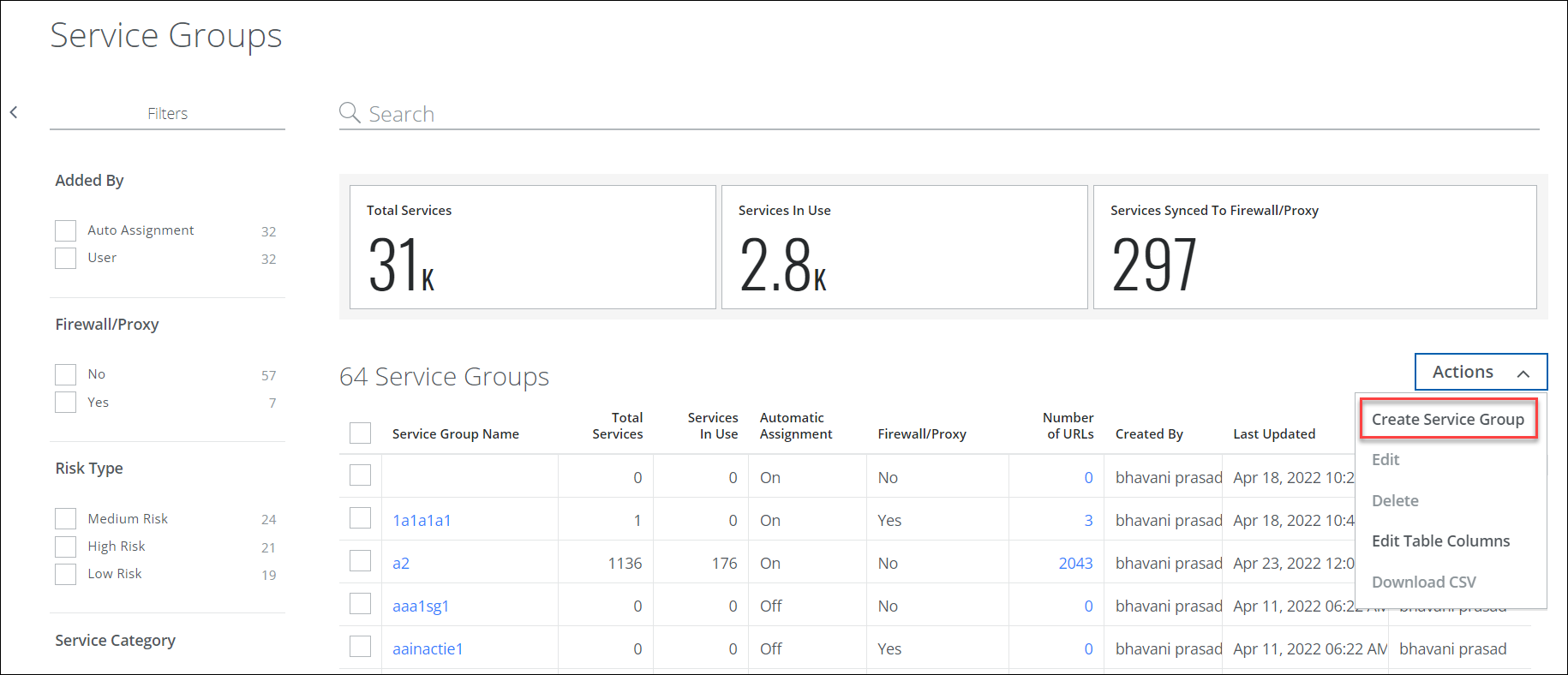
- Configure the following:
- Name: Enter a name to identify the Service Group. You can name a service group with up to 30 characters.
- Description: Enter a description for your reference.
Known Issue: Do not use white space or special characters when you create the service group name. If there is white space in the service group name, and if the service group is used in Panorama integration, there can be problems accessing the published URL list.
- Click Save. The rest of the Service Group configuration occurs in the Services tab. No changes are final until you save the Service Group.
- Once the Service Group is created, apply a policy under the Web Policy > Policy > Application Control:
- Navigate to Web Policy > Policy > Application Control.
- Click Add Service Groups.
- Select ArtificialIntelligence:
- You can block AI/ML domains by configuring them under the predefined web filtering list. To configure AI ML Domains in Predefined Lists
- Navigate to Web Policy > Policy > Web Filtering.
- Click Select Criteria to Search for URL parameter string.
- Set the Operator as is in.
- Click Select Value > String List > AI-ML Domains.